
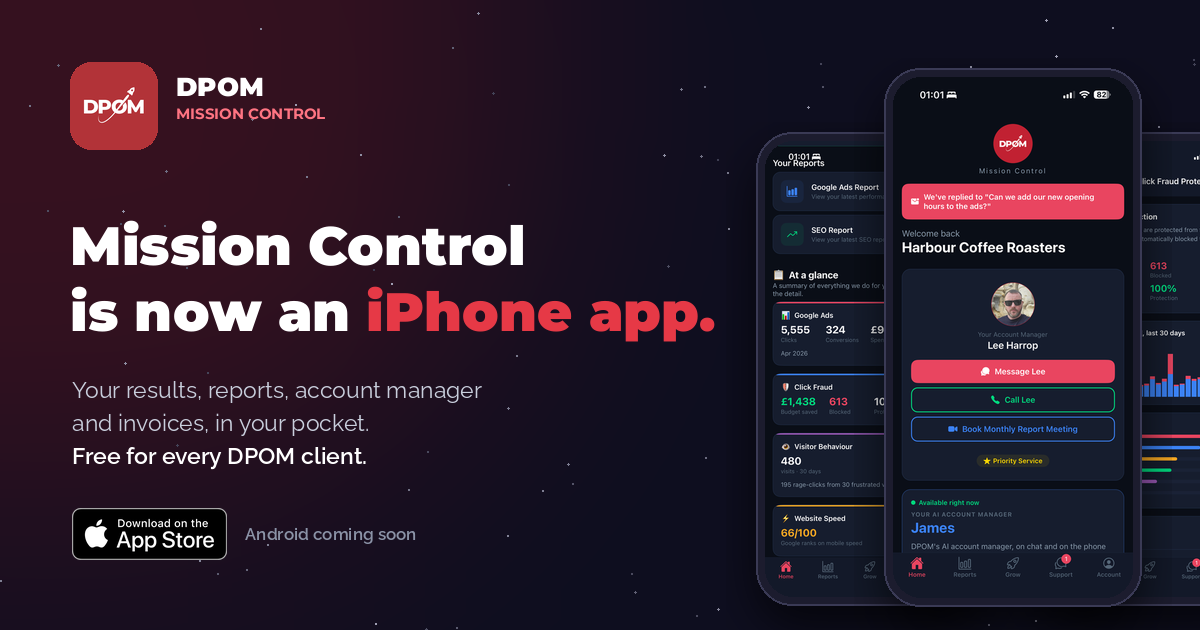
Mission Control has been the DPOM client portal for a while now. It is where your reports live, where you raise a ticket, and where you check what we did last month and what it cost. Today it becomes something better. Mission Control is a proper iPhone app, it is on the App Store, and it is free for every DPOM client.
This post walks through everything the app does, screen by screen, who gets it, how to install it, and what is coming next, including Android. If you would rather skip the reading, the App Store button is a little further down and on our Mission Control page.
Why we built an app at all
Most agencies send a report once a month and keep everything else behind closed doors. You get a PDF, perhaps a call, and the rest of the time you are trusting that someone is looking after things. We have never liked that. Everything we do for a client is logged, measured and visible in the portal, so you can see exactly what is happening on your account and exactly what we are doing about it, any time you like.
The trouble with a portal is that you have to go to it. You have to remember the address, find the login and sit at a laptop. An app fixes that. It lives on your home screen, it signs you in with Face ID, and when something happens, a report landing, an invoice arriving, a reply from your account manager, it tells you. Nothing about the work changes. The difference is that you no longer have to go looking for it.
Everything the app does
The app has five tabs along the bottom: Home, Reports, Grow, Support and Account. Here is what sits behind each one. Exactly what you see depends on the services you are with us for, so an SEO client will not see Google Ads figures and a Google Ads client will not see an SEO report, but the shape is the same for everyone.
Home: your account manager, one tap away
The home screen opens on the person who runs your account. Not a support desk and not a ticket queue, but the named person on our UK team who makes the changes on your account and knows your business. There are three buttons under their face: message them, call them, or book your monthly report meeting. That is deliberate. The fastest way to sort most things is still a quick word with the person who looks after you.
Below that sits James, our AI account manager, then your performance for the month, your click fraud protection, your reports and your support tickets, so the whole account is one scroll from top to bottom.
When your account manager replies to a message, the reply appears as a banner at the top of the home screen, and you get a push notification the moment it lands.

Your results, day by day
For Google Ads clients, the performance card shows clicks, conversions and impressions for the current month, with a daily chart of clicks against conversions, updated every day. No logging in anywhere and no waiting for the monthly report to find out how it went. SEO clients see their SEO progress in the same place.
One thing worth knowing: Google Ads can take anywhere from a day to three weeks to register a conversion, so the app says so on the card rather than leaving you to wonder why yesterday looks quiet.
Above the numbers is a row of achievements. These are the milestones your campaign unlocks along the way, such as 500 clicks, 5,000 clicks, 100,000 impressions or your first £5,000 of spend. When you unlock one, the app tells you. It is a small thing, but it is a nice way to watch an account grow.

Reports: every report, at a glance
The Reports tab holds your Google Ads and SEO reports, the same ones your account manager walks you through each month, and a summary of everything we do for you on one screen. The at a glance cards give you the headline numbers without opening anything: clicks, conversions and spend for Google Ads, the budget Sentinel saved you from click fraud, your visitor behaviour for the last 30 days, and your website speed score. Tap any card to see the detail.
Two cards matter more than the rest. Results shows your headline numbers from the last completed month. What we did lists the work we carried out on your account that month, in plain English. It is the answer to the question every client should be able to ask, which is what am I actually paying for, and it is there whenever you want it.

Sentinel: see the clicks we block
Sentinel is our click fraud protection and it runs on every Google Ads account we manage. The app shows you what it is doing: clicks tracked, clicks blocked, the budget it saved you and your protection score, with a bar chart of legitimate against blocked clicks for the last 30 days.
Scroll down and it breaks the threats down by type, so bots, VPNs, click farms, data centres, proxies and Tor, and by location, so you can see where the fraud came from. Most clients have never seen this side of their account before, because most agencies do not have it to show. We think you should be able to see the money you are not losing as clearly as the money you are spending.

Nebula: where your visitors click
Nebula is our visitor analytics tool, and the app brings its heatmaps to your phone. Pick a page on your website and see where people click, where they rage-click, which is the same spot over and over and usually means a button that is not working, where they dead-click, which is tapping something that looks like a link but is not, and how their mouse moves across the page. Warmer means more activity.
You can also watch recordings of real visits to your site. It is the quickest way we know to understand why a page is not converting, because you stop guessing what people do and simply watch them do it.

Insights: plain English findings
Heatmaps are only useful if someone reads them, so the app does that for you. The Insights screen turns the last 30 days of visitor data into findings you can act on: how many rage clicks there were and on which page, what share of visitors never scroll past the first screen, how many dead clicks there were and where, how much of your traffic is on mobile, which page people leave from, and how your bounce rate compares with most sites.
Each finding comes with a line on what it means and what to change. If most of your message sits below the fold, it will tell you to move your offer and your call to action higher. If people keep tapping an image expecting it to do something, it will tell you that too.

Grow: how fast your website really is
The Grow tab scores your website on mobile speed using Google's own data, the same Core Web Vitals Google uses when it decides where to rank you. You get a score out of 100 and the three measures behind it, loading speed, responsiveness and visual stability, each set against Google's target with a plain note on what it means. You can run the test again whenever you like.
If your site is holding you back, the same screen lets you request a free homepage concept from us, built for speed, with a guarantee in writing that it will meet Google's Core Web Vitals. You can take a new site outright or rent it from £49 a month with hosting, business email and unlimited updates included. There is nothing to pay to see the concept and no obligation once you have.

Support you can follow
Raise a ticket from the app and follow every reply as a conversation, with a status on each one so you always know whether it is with us or waiting on you. Replies also appear on the home screen, so you will not miss one.
If something is not right, there is a separate button for that. Tell us what has gone wrong and our customer care team looks into it properly and tracks it from start to finish, and you can see that tracking. We would much rather you told us and watched us fix it than went quietly.
And if you prefer an instant answer, James is on the same screen.

James, day or night
James is DPOM's AI account manager, and he is in the app on chat and on the phone, available whenever you are. How are my ads doing? What did I spend this week? When is my next report due? He answers in seconds, any time of day or night, and he can tell you anything about your account.
What he does not do is change anything. Only people do that. James is there for the questions that cannot wait, and he sits on top of your account manager, never instead of one.
Billing sorted
The Account tab is where the admin lives. View and download every invoice, update the card your subscriptions bill to, find the agreements you have signed with us and update your billing or contact details, all without emailing anyone.
It is also where you invite team members, each of whom gets their own login, and where you will find our refer a friend scheme.

Notifications that matter
We have been careful here, because nobody wants another app that nags. Mission Control tells you when a new report is ready, when an invoice lands, when your campaign unlocks a milestone, and when your account manager replies to you. That is the list. Everything else waits until you open the app.
Face ID sign-in
Sign in once with the email address your DPOM reports come to. We send a one-time code, so there is no password to remember or forget, and from then on Face ID or your fingerprint signs you in. The app only ever shows your own account, and nothing is shared with anyone else.
All of this, in one place. The results, the reports, the clicks we block, the heatmaps, the findings, the support and the billing, all in one place and all visible whenever you like. Now it fits in your pocket.
Who gets it
Every DPOM client. Mission Control comes with every DPOM package, whether that is Google Ads, SEO or social, and the app is free, and always will be. It works on iPhone and iPad. If you have colleagues who should see the numbers too, invite them from the Account tab and they get their own login.
How to get it
Getting set up takes about a minute.
- Download the app. Tap the App Store button below on your iPhone or iPad, or open dpom.co.uk/app on your phone. Reading this on a laptop? Point your phone camera at the QR code.
- Sign in. Use the email address your DPOM reports come to. We send a one-time code, and from then on Face ID does the rest.
- Allow notifications. So you hear the moment a report is ready or an invoice lands, instead of having to check.
Get Mission Control on your iPhone or iPad
Free for every DPOM client. Sign in with the email your reports come to.

On a laptop? Scan the code with your phone. Or open dpom.co.uk/app.

One thing catches people out. If you search the App Store for Mission Control, you will not find it. That is on purpose. The app is only for DPOM clients, so it is not listed publicly. Use the button or the link above and it opens straight away.
Android is coming soon
The iPhone app is out first, and an Android app is next on our list. In the meantime, everything in this post already works in your phone's browser at mc.dpom.co.uk, so nobody on Android is missing out on the results, the reports, the support or the billing. What you do not get yet is the icon on your home screen, Face ID and push notifications, and those are exactly what the Android app is for. We will tell every client the moment it is ready.
Not a DPOM client yet?
You can have a look around before you decide. There is a live demo of the portal at mc.dpom.co.uk/demo with a sample account in it, and it is the same thing you get in the app. Mission Control is included with every package, so if you are weighing up Google Ads management, our Google Ads pricing starts at £145 a month and the app, the portal, Sentinel and James are all part of it. You also get a named account manager on our UK team, which is the bit the app is built around.
Questions people ask
Is the app free?
Yes. Mission Control is free for every DPOM client, and always will be. There is no premium tier and nothing to unlock.
I searched the App Store and cannot find it.
That is on purpose. The app is only for DPOM clients, so it is not listed publicly. Use the App Store button in this post, or open dpom.co.uk/app on your phone, and it will open straight away.
What about Android?
The portal works in any phone browser at mc.dpom.co.uk today, and an Android app is next on our list. We will let every client know as soon as it is ready.
Can my team use it?
Yes. Invite team members from the Account tab and they get their own login, with Face ID on their own phone.
Is my data safe?
You sign in with a one-time code or Face ID, and the app only ever shows your own account. Nothing is shared with anyone else.
Does the app replace my account manager?
No, and it never will. A named person on our UK team runs your account and makes every change on it. James helps in between with the questions that cannot wait. The app is simply the quickest way to reach both of them.
I am an SEO client. Is it still worth having?
Yes. Your SEO report, your visitor heatmaps and insights, your website speed score, support, James and your invoices are all there. The Google Ads cards simply do not show, because you do not have Google Ads with us.
Does it work on iPad?
Yes. The same app runs on iPhone and iPad, and you can be signed in on both.
Mission Control is free, it is on the App Store now, and if you need a hand getting set up, your account manager is a tap away.

Brett Dixon
Founder & Managing Director of DPOM. Brett founded DPOM nearly 15 years ago after a career in marketing working with Harvey Nichols, BBC Top Gear, Formula One circuits, and UK Trade and Investment. His passion became helping smaller businesses grow, with honest advice, no jargon, and realistic expectations.
Ready to Grow Your Business?
Speak to our team about how we can help your business grow.