Speak to our teamOur team 0115 647 0111 Call us

Custom Google Ads scripts · Google Partner · 15 years

Custom Google Ads scripts and automation.

Google Ads scripts are bespoke JavaScript automations that run inside your account, doing in seconds what would take hours by hand. Our in-house UK team builds, tests and maintains scripts tailored to your campaigns.

4.8 from 395+ reviews

Where do I find this?

Sign in to Google Ads. Your Customer ID is the 10-digit number at the top right, next to your account name, for example 123-456-7890.

From task to time saved

What is eating your time in Google Ads? A script can take over.

Tap a step to see the problem, what a script does about it and where it sits in our service.

Every repeat job in Google Ads can be handed to a script. Tap one.

Routine checks and edits take hours every week. A script runs the job on a schedule, in seconds, around the clock.Every packageSee what we build

A campaign overspends or conversions stall and nobody notices for days. Alerts by email or Slack the moment a metric leaves your thresholds.Every packageSee alerts

Reports mean exports, copy-paste and spreadsheets. Scheduled reports written into Google Sheets or your inbox, built around the numbers you care about.Every packageSee reporting

Wasted spend hides in search terms, dead landing pages and untidy structure. Search-term analysis, broken-URL checks and label automation surface it for you.Every packageSee search terms

Results scattered across tools. Mission Control puts your results and reports in one place, with James to answer questions day or night.Every packageSee Mission Control

What we build

Scripts we build and maintain. From a single alert to a full automation suite.

These are the scripts we are asked for most often. If your need is not listed, we almost certainly still build it.

More detail

Our custom Google Ads scripts are written for your account, tested against your real data in a read-only preview first, and documented in plain English. We build scripts for businesses running their own Google Ads and for agencies that want automation beyond the native tools.

Anomaly and spend-spike alerts

When it fits
You want to know the moment spend or conversions move out of line.
What we do
Watch spend, conversions, cost per acquisition and clicks against your thresholds.
More detail

Watch spend, conversions, CPA and clicks against your thresholds. The moment a campaign overspends, conversions stall or a spike appears, you get an email or Slack alert before it costs you a fortnight of budget.

Also part of what we build

Quality Score and pacing monitors

Track Quality Score movements and budget pacing over time and alert you to drops before they inflate your costs. Catch the slow declines that never trigger a standard rule until the damage is done.

Weather, stock and feed-based bidding

Pull live data from a weather API, your stock feed or a pricing source and bid accordingly, pushing harder when conditions favour you and pulling back on out-of-stock lines. Automation that reacts to the real world, not just the account.

What they are

What are Google Ads scripts?

Google Ads scripts are pieces of JavaScript that run directly against your account through the platform's built-in scripting engine.

Read everything Google holds

A script can read every metric Google holds, make changes on a schedule, and email or message you the moment something needs attention.

One of the least used features

Scripts are one of the most powerful features in Google Ads and one of the least used, because writing them well takes JavaScript skill and a real understanding of how the Google Ads API behaves.

Bespoke, not off the shelf

A bespoke script does exactly what your business needs and nothing it does not, with no subscription stacked on top and your data kept inside your own account.

More detail

That is the gap we fill. Off-the-shelf rules and third-party tools force your account into someone else's template and often charge a percentage of your spend for the privilege. A bespoke script runs around the clock without a subscription stacked on top, and once it is live it works every hour of every day, reacting faster than any human review cycle could.

The best Google Ads scripts are the ones written for your account, not pasted in from the internet. Every build starts with the outcome you are after, then we write the smallest, safest piece of code that delivers it, test it against your real account in a read-only preview first, and hand it over with plain-English documentation so you always know what it does.

Searching for custom AdWords scripts, Google AdWords scripts, PPC scripts, Google ad scripts, scripts for Google Ads or a script Google Ads can run on a schedule? It is the same thing under an older name. We are a Google Ads scripts agency for businesses and for agencies, and our Google Ads automation scripts sit inside our Google Ads management. See our pricing packages or ask for a free Google Ads audit.

How we work

Why bespoke scripts, built safely. Custom code is only an asset if it is written carefully.

Anyone can paste a script they found online into a live account. The danger is that you rarely know what it changes, whether it suits your structure, or what happens the day Google updates the API beneath it.

From brief to a script that keeps working

  1. Step 1Built for your accountThe smallest, clearest script that achieves the outcome.
    More detail

    We start from the outcome you want and write the smallest, clearest script that achieves it. No bloat, no settings you will never touch, and no behaviour you did not ask for. Because it is yours, it fits your campaigns precisely instead of forcing them into someone else's mould.

    You never have to read or write a line of JavaScript. We handle the building, testing, deployment and upkeep. You simply tell us the problem or the task you want gone.

  2. Step 2Tested before it touches spendA read-only preview on your real account first.
    More detail

    Every script is trialled against your real account in a safe, read-only preview first, so we can see exactly what it would change before anything goes live. We add sensible guard rails and limits, then deploy only once we are confident it behaves. Your budget is never the test environment.

  3. Step 3DocumentedPlain English: what it does and when it runs.
    More detail

    You get plain-English documentation explaining what each script does and when it runs, so you always know what is working on your account.

  4. OngoingMonitored and maintainedKept current as the API and your campaigns change.
    More detail

    Google's platform evolves, so we keep your scripts current as the API and your campaigns change, and we are on hand if anything ever needs adjusting. It is automation you can trust to keep working, not a one-off you have to babysit.

Real results for real UK businesses

Case study · Legal

LMP Law. 1200% more leads, with no increase in cost.

  • 95%Reduction in CPA
  • NoIncrease in Cost
  • 2692%Increase in Conv. Rate

Read the case study: LMP Law

How we did it

Before

After performing an audit, we discovered that LMP Law’s campaigns were poorly targeted with poor quality ad copy that resulted in poor CPCs and a low Quality Score.

What we did

We rebuilt the campaigns using best practices and introduced smart bidding strategies combined with better keyword targeting and ad copy to drive consistent growth without any increase in budget.

Nottingham law firm, property market.

Figures as published on each case study page, with the services each one lists. All case studies

Google Ads packages

Script work sits inside our Google Ads management. Pick your package by your monthly ad budget.

A flat monthly fee for our management, based on the ad budget you want managed. Your ad budget is paid to Google direct, never through us.

More detail

All prices are +VAT. Any advertiser can choose any package, provided they do not exceed the maximum monthly ad spend shown. Agencies that want scripts for their own clients can also ask us about this.

Starter

Managed by our UK team

from£145a month + VAT

Up to £500 a month of ad budget, supported by tickets

Comes with

  • Google Ads management and script workManaged by our UK team.
  • Sentinel click fraud protectionSwitched on from day one.
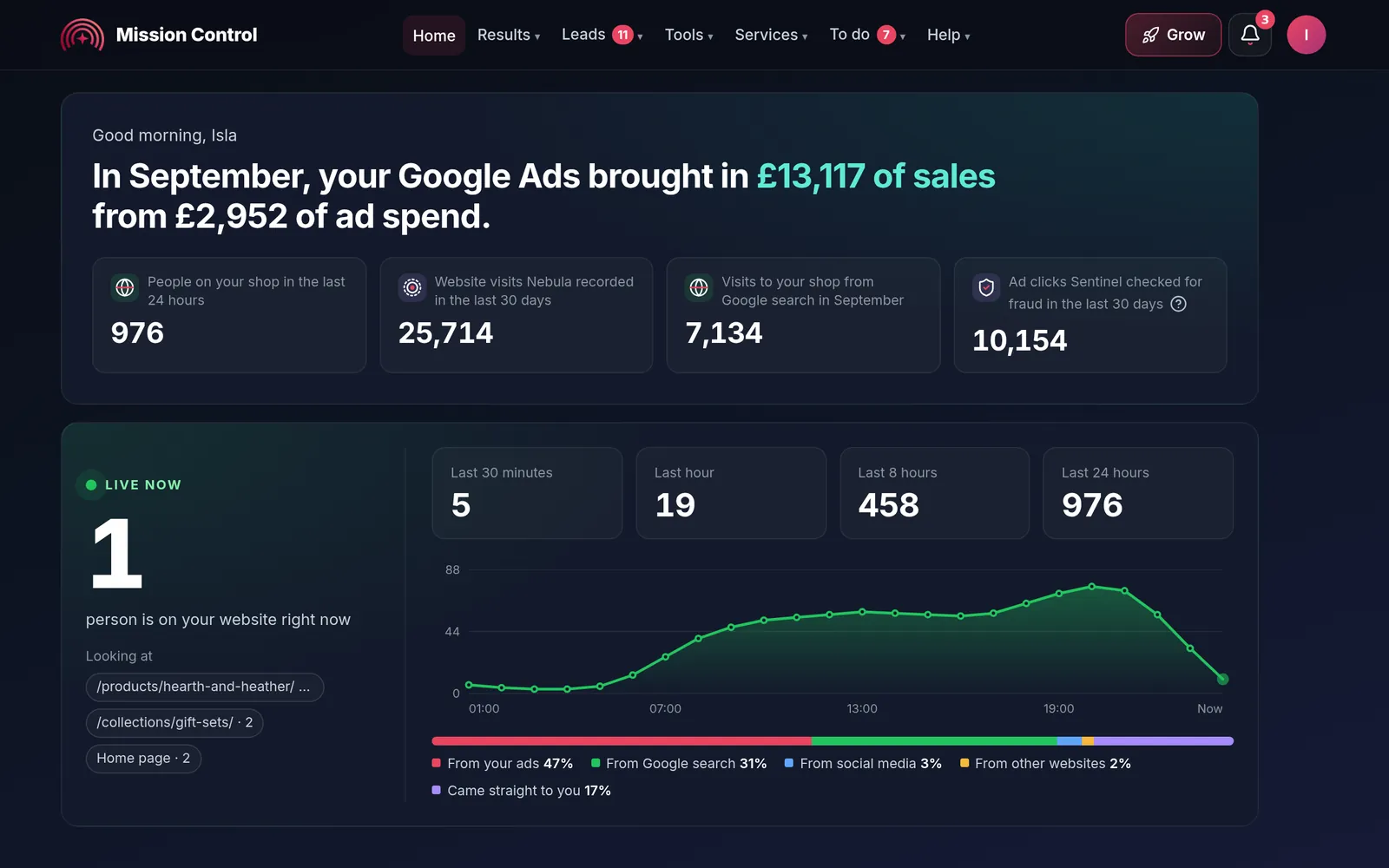
  • Mission Control, James and the Form BuilderYour tools in one place, and James for an update any time.

Tools included, worth£65 a month

Get my quote

Lite

Your own account manager

from£295a month + VAT

Up to £2,500 a month, with an account manager

Everything in Starter, plus

  • Your own account managerPrebooked calls and video meetings.
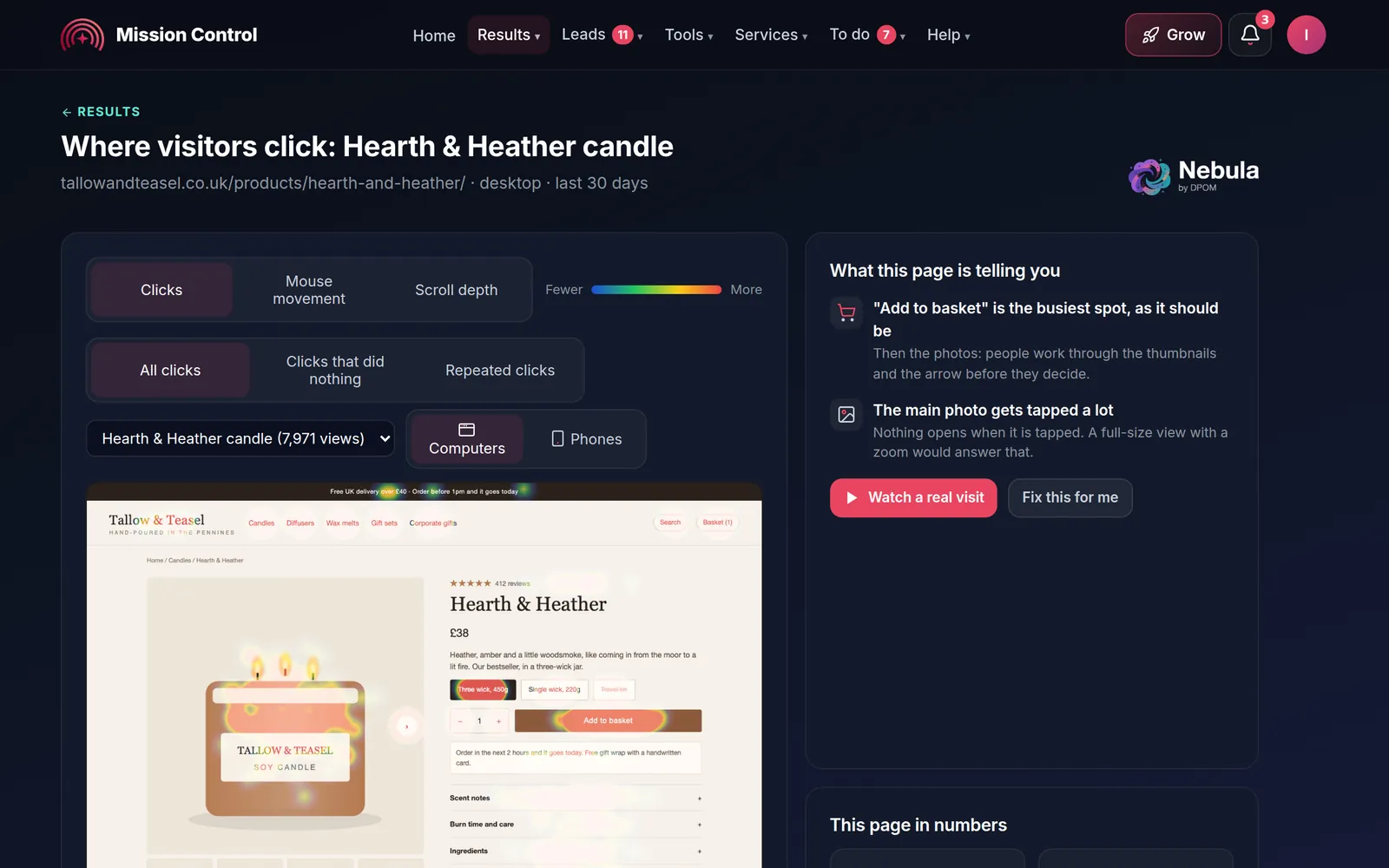
  • NebulaSee where visitors click, scroll and drop off.

Tools included, worth£110 a month

Get my quote

Most popular

Standard

Account manager + priority phone

from£445a month + VAT

Up to £7,500 a month, priority phone support

Everything in Lite, plus

  • Conversion-rate workLanding-page testing.
  • Relay ConvertSee which calls came from your ads. 130 minutes, 8 numbers.
  • Orbit StarterAI chat for your website. 300 conversations a month.
  • Priority phone supportAnd AI Call Answering.

Tools included, worth£289 a month

Get my quote

Elite

Two managers + senior strategist

from£695a month + VAT

Up to £15,000 a month, with senior strategy

Everything in Standard, plus

  • Two managers and a senior strategistStrategy and forecasting at senior level.
  • More Relay Convert250 minutes, 8 numbers.
  • Orbit Business1,000 conversations a month.

Tools included, worth£378 a month

Get my quote

By appointment

Premium

Direct access to Brett Dixon, MD

from£1,500a month + VAT

Brett runs your account and is available on demand

Everything in Elite, plus

  • No cap on ad budgetA bespoke retainer.
  • Quarterly strategy sessionsBy video, with a board-ready monthly report.

Tools included, worth£378+ a month

Discover Premium
  • You own your account.Set up under your own login.
  • Flat fee, never a percentage.Your ad budget goes to Google direct.
  • Click fraud protection.Sentinel is switched on from day one.
  • No long contract.Monthly rolling, with 31 days’ notice.

Not sure what to automate? Tell us the task that eats your time or the spend you want to protect, and we will say plainly what a script can do.

Compare every feature

Request a free audit

Already running Google Ads? Tell us about your account and we will come back with a short, plain-English review of where the budget is leaking. No cost, no obligation, and you keep the findings.

Get my free audit

Software we built

Scripts do the routine. Our tools protect and report.

Scripts sit alongside the tools we built ourselves. Tap a tool to see the real screen. The package cards above show which tools come with which package.

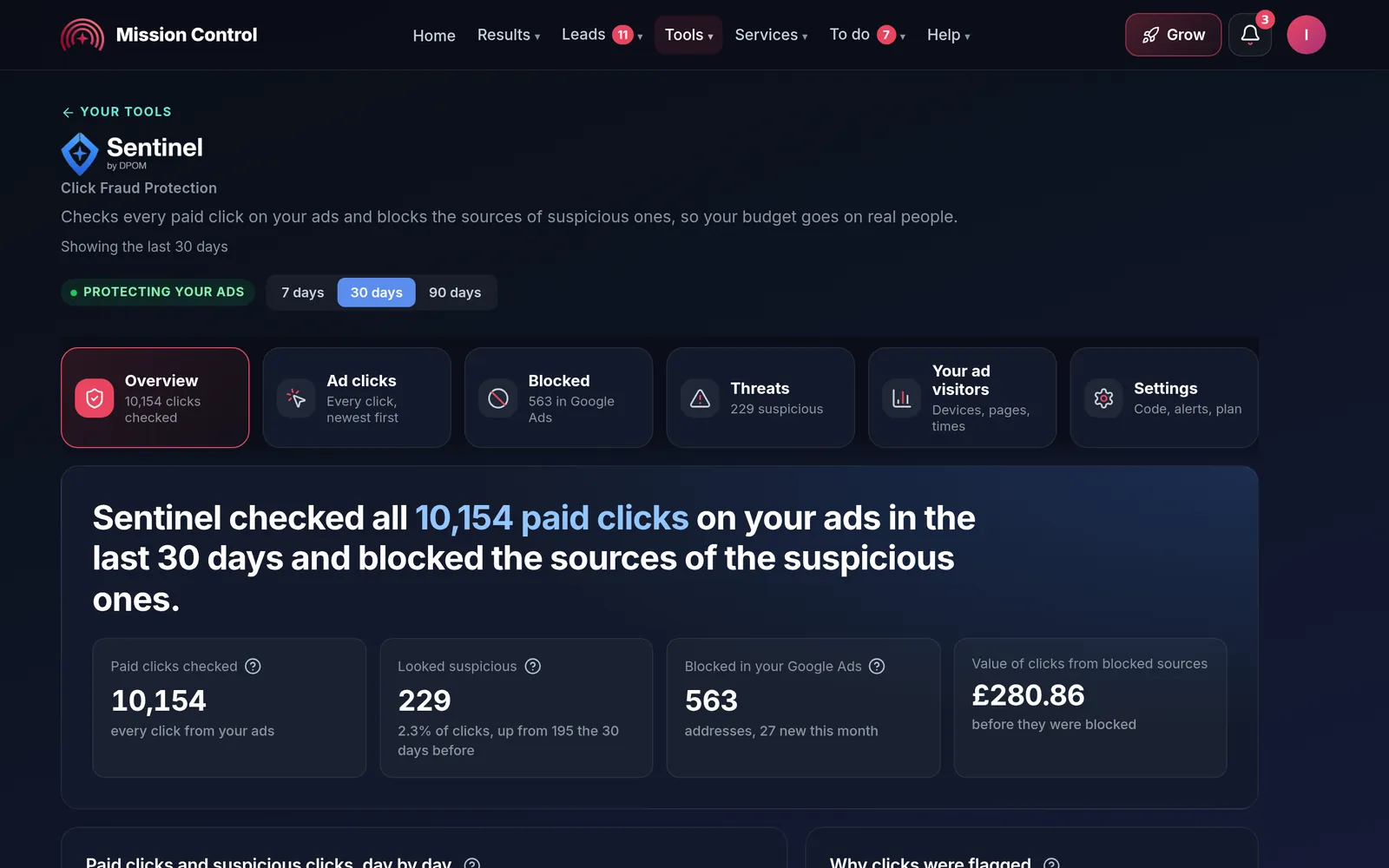
Sentinel Click Fraud Protection

Scripts catch overspend inside the account. Sentinel looks at who is clicking, blocking the sources of suspicious clicks so more of your spend reaches real customers.

Sentinel in Mission Control, demo account: every paid click checked, suspicious clicks day by day and why they were flagged

Real screens from Mission Control, shown with our demo account, Tallow & Teasel, an invented shop with sample data.

What our clients say

4.8 from 395+ reviews

Really happy Camilla and Lee. Im a small business in Derby and google ads and seo is something I don't understand but the guys take there time to explain it to me in a way I understand and ultimately, I get more customers which is what counts

Norbert · Feefo, Mar 2025

Camilla and Lee are two of our senior marketing managers.

Read our reviews

Who runs your account

A real team runs your Google Ads. James helps in between.

Your account is handled by experienced people on our UK team, with a named account manager from Lite upwards. James, our AI account manager, answers questions day or night and passes your instructions on.

AI does the routine, people decide. Every change James makes is based on data, and your account manager can override it.

Meet the team
  • Camilla, Senior Marketing Manager at DPOMCamillaSenior Marketing Manager
  • Lee, Senior Marketing Manager at DPOMLeeSenior Marketing Manager
  • Patrick, Senior Support Manager at DPOMPatrickSenior Support Manager
  • Valerie, Operations Manager at DPOMValerieOperations Manager
  • Brett Dixon, Founder and Director at DPOMBrettFounder & Director
  • Jayme Dixon, Director at DPOMJaymeDirector
  • Nige, Director at DPOMNigeDirector
  • James, AI account manager at DPOMJamesAI account manager, 24/7

Before you choose someone to build scripts

Why choose DPOM for Google Ads scripts? Ask anyone these questions. Here are our answers.

Our answers are backed in writing by our Transparency Guarantee. Take the list with you and compare.

  1. Is the script tested before it touches my spend?

    YesEvery script is trialled against your real account in a read-only preview first, with guard rails and limits added before it goes live.

  2. Will I know what it does?

    YesYou get plain-English documentation explaining what each script does and when it runs.

  3. Who looks after it when Google changes something?

    YesWe do. We keep your scripts current as the API and your campaigns change, as part of your ongoing management.

  4. Do I need coding skills?

    NoNo. We build, test, deploy and maintain the scripts. You tell us the task.

  5. Does my data leave my account?

    NoA bespoke script keeps your data in your own account, with no extra software fee.

  6. Do I own my Google Ads account and data?

    YesYour account and its data belong to you, set up under your own login. If you ever leave, you keep everything.

  7. Am I tied into a long contract?

    NoNo long contract. Monthly rolling, with 31 days’ notice.

  8. Is a real person in charge?

    YesYour account manager on our UK team makes the decisions on your campaigns. James, our AI account manager, answers questions and, on accounts where we switch him on, makes routine changes from your account's own data, which your account manager can override or undo.

After you choose

Your first 90 days, mapped out. What happens after you enquire.

No mystery about what happens next. Here is the plan, step by step.

Your first 90 days

  1. Day 1Kickoff and auditWe learn your business and audit your account, or build from scratch.
    More detail

    Your dedicated Google Ads specialist talks to you about your goals and objectives, and learns as much about your business as possible, with a questionnaire and a detailed discussion with your account manager. We talk through your return goals and what makes you stand out.

    We then analyse your account data and research your competitors. If you are new to Google Ads, we do the keyword research and work out how your customers will find you. Sentinel click fraud protection is switched on from day one.

  2. Typically week 1Tracking, then the buildConversion tracking first, then campaigns built for your review.
    More detail

    We cannot improve what we cannot measure, so one of the very first steps on any account is to set conversion tracking up correctly. It lets us learn which keywords and ads lead to calls, emails, forms and sales. Our in-house technical team works with you to make sure every conversion is tracked accurately.

    We then build campaigns of the types most likely to give you the results you expect, and tell you when the first build is complete so you can review it and give feedback. We work with you on it, because working together gives the best results.

  3. Typically week 1 or 2Launch and learnCampaigns go live, then we learn from real data, not knee-jerk changes.
    More detail

    Once you are happy, we go live. Timing depends on account access, your approvals and the platform’s own ad review.

    After launch we focus on collecting meaningful data rather than making knee-jerk changes. We monitor search terms, audience signals, devices and locations, then refine keywords, ad copy, bids and targeting. This is still the learning phase, so the aim is steady improvement and less obvious waste, not perfection overnight.

  4. MonthlyReport, optimise and growA plain-English report, a meeting to plan the next month, and continuous optimisation.
    More detail

    Each month you get a detailed report and a meeting to walk through the results and plan next steps. We are transparent: we do not expect campaigns to be highly profitable straight away, and it can often take three months or more of data and refinement before performance really takes off.

    Each month we use the previous month’s data to refine your campaigns: testing new ideas, reallocating budget towards top performers and reacting to seasonal trends, with regular review meetings so the approach stays in line with your wider business goals.

Want a second opinion on your current account?

People and AI, together

Experienced people at the helm. Our own AI behind them.

DPOM has looked after UK businesses since 2011, and your account manager still runs your account. Behind them now is a system we built in-house: tools that turn visitors into enquiries, and James, our AI, watching your account day and night.

  • Camilla, Senior Marketing Manager at DPOM
  • Lee, Senior Marketing Manager at DPOM
  • Patrick, Senior Support Manager at DPOM
  • Valerie, Operations Manager at DPOM

Your account manager at the helm

An experienced person on our UK team sets your plan, makes the big calls and approves anything you ask for. They can override or undo anything our AI does.

AI does the routine, people decide.

A family business, looking after UK businesses since 2011

James, DPOM's AI account manager

James, our AI, day and night

Ask him about your results, reports or next step in Mission Control, any time. He checks your tracking every weekday, flags ads that stop the same day and warns you before seasonal dips.

Where we switch him on, he makes routine Google Ads changes. Every change is based on your account's own data, and your account manager can override it.

See Mission Control

Every change James makes is based on data, and a person can always override it.

How we use AI to get you ahead, honestly

Google Ads scripts FAQs

Google Ads scripts FAQs.

What scripts are

What are Google Ads scripts?

Google Ads scripts are pieces of JavaScript that run inside your Google Ads account to automate tasks and changes. They can read your data, adjust bids and budgets, build reports, and send alerts, all on a schedule, doing in seconds what would take hours to do by hand.

What can custom Google Ads automation do?

Almost anything the platform exposes. Common examples include bid and budget automation, anomaly and spend-spike alerts, automated reporting into Google Sheets or email, n-gram and search-term analysis, 404 and broken-URL checking, label management, Quality Score and pacing monitors, and even weather, stock or feed-based bidding.

Why use bespoke scripts instead of off-the-shelf tools?

Off-the-shelf automation tools force your account into a fixed template, often charge a monthly subscription on top, and send your data through their systems. A bespoke script does exactly what your business needs, keeps your data in your own account, and has no extra software fee. It fits you, rather than the other way round.

Safety and support

Are Google Ads scripts safe to use?

Yes, when they are written and tested properly. Our in-house team trials every script against your real account in a safe, read-only preview before it goes live, adds guard rails and limits, and documents exactly what it does. The risk comes from pasting in unknown code from the internet, which is precisely what we help you avoid.

Do I need coding skills to use them?

No. You never have to read or write any JavaScript. We build, test, deploy and maintain the scripts for you. You just tell us the task you want automated or the spend you want protected, and we handle the rest.

Do you maintain the scripts after they go live?

Yes. Google's platform and API change over time, and so do your campaigns, so we keep your scripts current and working as part of your ongoing management. If something needs adjusting, our technical team is on hand to handle it.

What we build and who for

Can scripts automate bid and budget management?

Yes. We build scripts that adjust bids by time of day, device, location, day of week or conversion rate, and pace daily and monthly spend so a campaign never overshoots its cap. They react to performance signals far faster than a manual review cycle.

Can you send automated reports and alerts?

Yes. We set up scheduled reports written straight into Google Sheets or delivered to your inbox, plus instant alerts to email or Slack when spend spikes, conversions drop, or any metric you choose moves outside your thresholds. You catch problems the moment they happen.

Do you build scripts for agencies as well as businesses?

Yes. We build, test and maintain custom Google Ads scripts both for businesses running their own accounts and for agencies that want automation beyond the native tools across their client base. Either way, the build is tailored to the accounts it will run in.

Cost

How much do custom Google Ads scripts cost?

Script work sits within our Google Ads management, which is a fixed monthly fee based on your package and never a percentage of your ad spend. Managed plans start at £145 a month + VAT, there is no long contract, notice is 31 days, and you own your account. Use our instant quote tool for a price tailored to you.

Get started

Ready to automate your Google Ads?

The quickest way is a call. Tell us the task that is eating your time or the spend you want to protect, and we will tell you honestly what a script can do.

Call our UK Google Ads team0115 647 0111

Get in touch

Leave your details and we will be in touch.

What do you want automated?